Showing posts with label 12c. Show all posts

November 24, 2020

How to Recover a drop table in PDB 12CR1 database Using RMAN

 Hi Everyone,

Oracle introduced a new feature in 12c that you can now recover a drop table using RMAN

in this article, we will discuss  how to recover a drop table by the user in PDB

let's start :

before going to the actual topic I will show you how to connect to a PDB in Multitenant Architecture 

Connect to your PDB 

if you want to connect to your PDB there are 2 ways let see below:

1) connect to CDB using sqlplus / as sysdba 

2) alter session set container= PDBNAME

 let see the screenshot:


the other way is to connect using TNSNAMES

let's find out the service name using "lsnrctl status" command 


from the above screenshot, we can see that the service name of PDB is ORCL now let's add in tnsnames.ora as below:


after adding now try to connect as below:


yes connected to PDB using tnsnames.

from the above you can able to connect to PDB, Now let's move to the actual topic of recover a drop table.

check that database is in archive log mode or not:


from the above,, the database is not in archive log mode let's  enable the archive log mode using the below steps shown in SS.


Now our database is in archive log mode. 
connect to the PDB database and create user, table and grant access to them as below :


after creating the table I have inserted some records let's check that.


I have 3 records in the EMP table of SAM schema, 
connect to RMAN and take backup using the below command.
backup database plus archivelog;
after taking backup check the SCN Number of the database.


now connect to PDB and drop the table.


before recovering a table we need to create a directory for auxiliary instance where it will restore the data files.
connect to RMAN and run the following command to recover a table. 

RMAN> RECOVER TABLE "SAM".EMP UNTIL SCN 23875112 AUXILIARY DESTINATION '/u01/app/oracle/backup/';

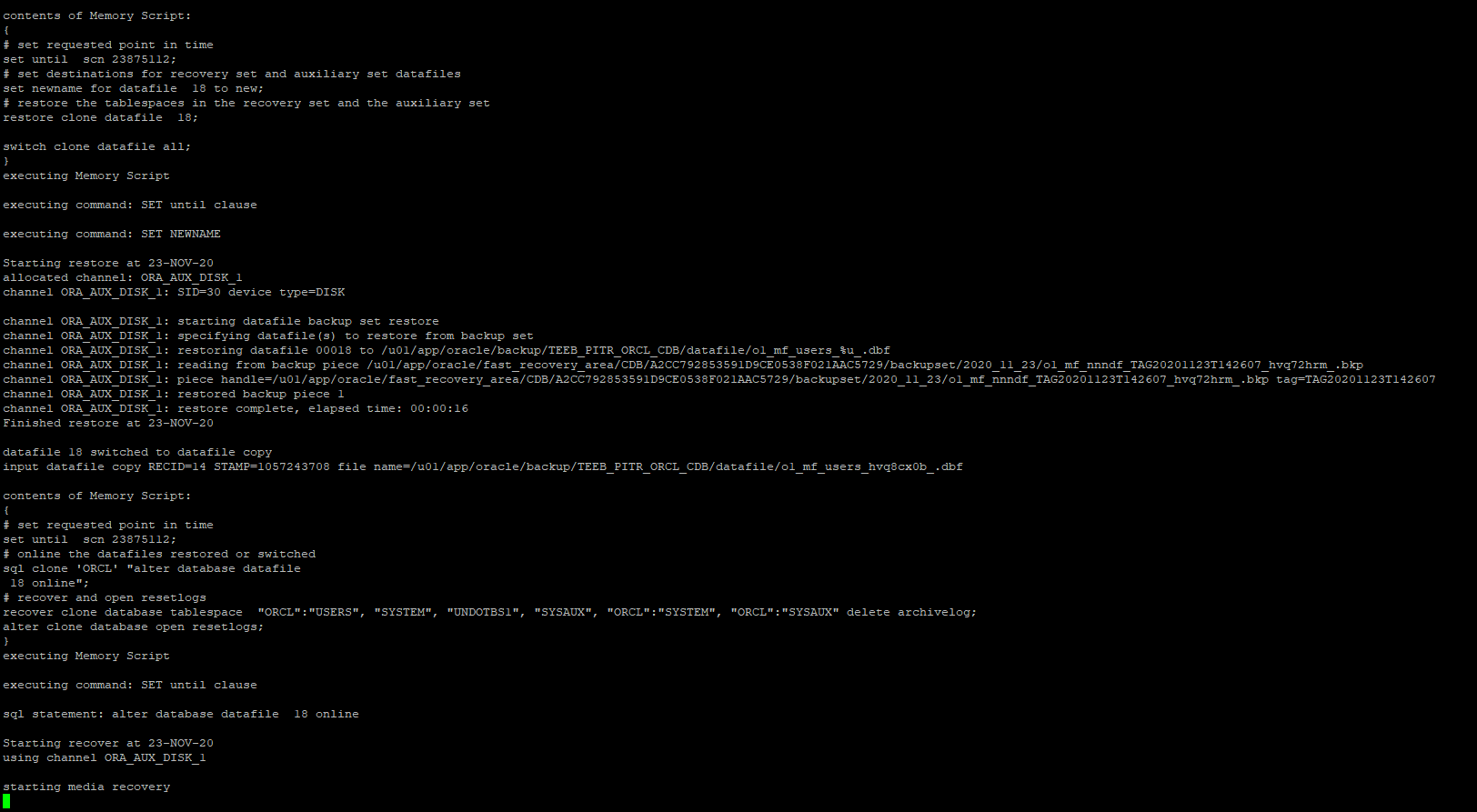
after running the above command I got the below output 


it says EMP not found in the backup because the above command is for NON-CDB and CDB. 
to recover from a pluggable database below is the command

RMAN> RECOVER TABLE "SAM".EMP OF PLUGGABLE DATABAES ORCL UNTIL SCN 23875112 AUXILIARY DESTINATION '/u01/app/oracle/backup/';


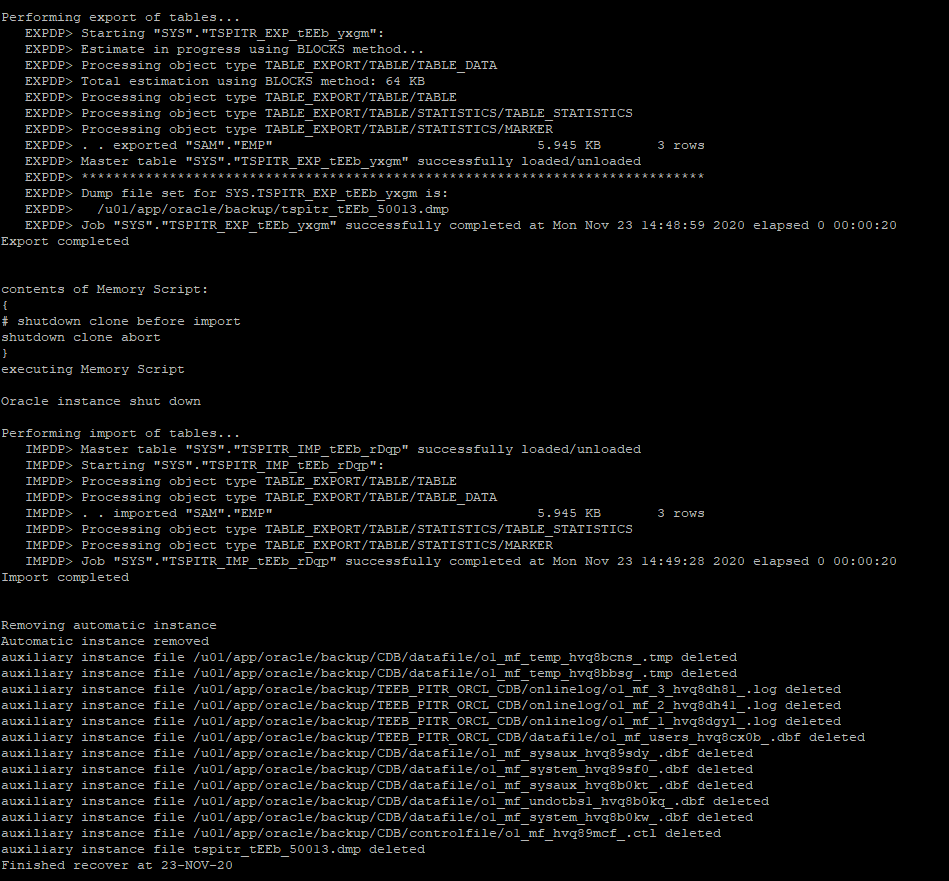
its recover the table and imported as shown in the above SS after imported it deleted all the auxiliary instance with data files and in the background, it using the data pump expdp and impdp to recover a table in 12CR1 database.


From the above SS, you can see that table is recovered with the data. 

Hope you all understood how to recover a table if it's drop accidentally. 
happy reading and give your feedback appreciated

Regards
Shaik Ahmed Ali


November 18, 2020

How to Convert/unplug and plugin the NON-CDB to CDB in 12cR1 database

 Hi guys, in this era of technology Oracle upgrading its product day by day so we also need to upgrade our selves on regular basis so in this article  will explain to you how to convert the NON-CDB to CDB in the 12c database or unplug and plugin the NON-CDB to CDB

Steps to do it are :

1) connect to the non-cdb and shutdown the database and open in the read-only mode as shown below in the screenshot


After performing the above task and opening the database in the read-only mode now create the manifest file using the below command :

exec DBMS_PDB.DESCRIBE (pdb_descr_file => '/u01/app/oracle/noncdb1.xml');


Now shutdown the NON-CDB database as below  


after the shutdown of the non-cdb database connect to your CDB database  and run the compatible command @ CDB database and if the output is YES then proceed, if its output is NO go and check the violation from the below query:
 
select name,cause,type,message,status from PDB_PLUG_IN_VIOLATIONS where name='NCDBNAME';

check the compatibility by running the below query at CDB 

SET SERVEROUTPUT ON;
DECLARE

Compatible CONSTANT VARCHAR2(3) :=CASE
DBMS_PDB.CHECK_PLUG_COMPATIBILITY
  (pdb_descr_file => '/u01/app/oracle/noncdb1.xml')
   
  WHEN TRUE THEN 'YES'

  ELSE 'NO'
  
  END;

  BEGIN
  DBMS_OUTPUT.PUT_LINE(compatible);
  END;

 /


After this, now time to create the Pluggable database using the manifest file created from the NON-CDB  show as below 


While creating the pluggable database there is 3 option for the datafile location which are 
  • COPY: it is the default, it means that data file will copy to the new location mention in the file_name_convert parameter and keep the original as it is while creating PDB so the NON-CDB database will be accessible after the creation of PDB 
create pluggable database orcl using '/u01/app/oracle/noncdb1.xml' copy  FILE_NAME_CONVERT =    ('old datafile loc/',' new datafile loc');
  • NOCOPY: it means it will use the original location of the datafile of NON-CDB to create PDB  so NON_CDB will not be available after creating the CDB
create pluggable database PDB2 using '/u01/app/oracle/noncdb1.xml' nocopy tempfile reuse;
  • MOVE: it will move the datafile to a new location and NON-CDB will not be available after PDB created.
create pluggable database orcl using '/u01/app/oracle/noncdb1.xml' move FILE_NAME_CONVERT =    ('old datafile loc/','new datafile loc');

 I am using the copy option while creating the PDB 

After PDB got created switch to PDB using the below command and run the @?/rdbms/admin/noncdb_to_pdb.sql


the end of the script looks like this shown in the below screenshot
          

now open the PDB in read-write mode using the below command 
alter pluggable database PDBNAME open;


Note: when your CDB is on a different host you need to copy the manifest file and datafile to the CDB host and update the new location in the XML file.


hope you all enjoy reading this article of convert or unplug/plugin NON-CDB to CDB, happy learning and give feedback which is appreciated 
thanks in advance.


November 12, 2020

Process Architecture in Oracle Database


In this blog I will discuss about the process architecture of oracle database how the client gets the connection which contains the following:

1)      Introduction to Process

2)      Client process

3)      Server Process

4)      Background Process


1)      Introduction to process

                   In Linux process is nothing but a running instance which serves request. Whenever we run a command a process is created for it which is responsible to serve request. Linux is a Multi-tasking OS in which multiple program can be run at a time. Oracle process is also a multiple-process oracle or Multiuser Oracle.

               In Oracle there will be a single process for a connected user or single process shared by multiple user depends on how there are connected either by shared or dedicated server process.

2)      Client Process:

                 Oracle Client is connection from Application to your database. Generally, application connect to the database using either directly such as sqlplus or by using JDBC, ODBC connection.

Connection and Sessions

Connection and sessions are most two common concepts which confuse the users to understand that both are the same but it is not.

i)                    Connection:

                Connection is a physical communication pathway between the client process and database instance. It is establish using the available interprocess communication mechanisms. Connection it occurs between an oracle client process and server process or dispatcher. Using Oracle Connection manager (CMAN) a connection may be established between client process and CMAN and the database.

ii)                  Sessions:

      session is a logical entity in the database which reside in memory and having state of current user connected to database, whenever a connection is comes from application a session is started at database level after the user get authenticated and ends the session when the user disconnects the application. Session is independent of other sessions for example if commit happens at one session it doesn’t affect the other session.

3)      Server process:

      Server process in oracle are created to handle requests from sessions connected to the instance. A client process always communicates with the database using the server process.

                         Serve process performs the task which include the following below:

·         It will do parse and run SQL statements issue by the user or application including the query plan

·         Execute PL/SQL code

·         It will also read the data block from datafiles into the Database Buffer Cache

·         It will also return the result back to the user or application.

Server process are of 2 types which are

i)        Dedicated Server Process

ii)      Shared Server Process


i)                    Dedicated Server Process:

        In dedicated server process we have a one-to-one connection between the application and server process, for example if we have 100 dedicated server connections then there will be 100 processes executing the request.


In dedicated server process client process communicates directly with its server process and keeps the connection until the user disconnect it. In dedicated server process Private SQL area present in PGA.

       If client process and dedicated process run on the same machine, then the program interface uses the host OS interprocess communication mechanism to connect to the database.

                    If client process and dedicated server process run on the different machine, then the program interface provides the communication mechanism (network services and Oracle net      service) between the programs.

ii)                    Shared Server Process:

                        In Shared server process the connection from the client receive at the dispatcher not at server process. For example, so 40 connections can connect to a single dispatcher which is responsible for the connection to a database.

                       The dispatcher process receives the connection from the client and put them into the request queue in the large pool. From large pool available shared server process takes the request and process it. after performing the request shared server process put the result into the dispatcher response queue.

                       Dispatcher process monitor this queue and send back the request to the client.


 4)      Background Process:

       Oracle background process are the process which run in the background/behind the scene and are meant to perform IO activities or to deal with abnormal conditions arising while the instance is running.

           There are two types of background process which are:

i)                    Mandatory BP

ii)                  Optional BP

i)                    Mandatory Background Process:

       This mandatory BP must always be running when the instance is up and running. Each background process has a specific purpose and its role is well defined.

Mandatory background process are below:

a)      System Monitor (SMON)

b)     Process Monitor (PMON)

c)      Log Writer (LGWR)

d)     Database Writer (DBW0)

e)      Check Point (CKPT)

f)       Recovere (RECO)

a)      System Monitor (SMON):

         System monitor performs recovery when a failed instance start up again.it also free up the temporary segments that are no longer in use. These transactions are recovered by SMON when tablespace or datafile brought back online.

         In RAC environment SMON process of one instance can perform the instance recover of other instances present in cluster if failed.

          SMON checks the SCN in all datafile headers when the database is started.it checks the SCN of datafile and compare it with the SCN of control file so if it matches then everything is OK if not the database is in inconsistent state.

b)     Process Monitor(PMON):

      This process monitor performs process recovery when a user process fails. It will rollback uncommitted transactions. PMON is also responsible for cleaning up the database buffer cache and freeing resources that were allocated to a process.it also registers information about the instance and dispatcher processes with network listener. PMON also checks on the dispatcher processes and server processes and restarts them if they have failed.

c)      Log Writer (LGWR):

         Log writer process writes data from redo log buffer cache to the redo files on disk.

The LGWR writes the data to redo files on below conditions

·         When a transaction is committed

·         When a transaction is rollback

·         Every 3 seconds

·         When the redo log buffer is 1/3 full.

When a transaction is committed, a system change number(SCN) is generated and tagged to it.log writer puts a commit record in the redo buffer and writes to disk immediately along with transaction redo entries.

              Log writer writes the data to redo log group in a circular fashion. If any error occurred with the redo log file, the log writer will log this error in to the LGWR trace file and system alert log file.

d) Database Writer(DBWRn):

    This process writes the dirty buffers present in the database buffer cache to the datafiles. The process does the multi-block writing to disk asynchronously. Oracle allows a maximum of 20 DBWR processes.

DB_WRITER_PROCESSES is an initialization parameter which specifies the number of database writer processes to start. Database select an appropriate default setting based on the number of CPUs and the number of processor groups available for the server.

The DBWR writes the dirty block to datafile on following conditions:

·         When a checkpoint is issued.

·         When a server process cannot find a clean reusable buffer.

·         Every 3 seconds time-out

·         When a log switch occurs

·         When Dirty-Blocks are becoming LRU Blocks

·         When it reaches the threshold value

·         When database shuts down.

e)     Checkpoint Process (CKPT):

    This process signals the synchronization of all database files with the checkpoint information.it make sure that the data consistency and faster database recovery in case of database crash. CKPT also ensure that the changes happen to the block at database buffer cache at that point are written to the datafiles but the writing is done by DBWR.

       When the checkpoint occurred the log writer process will update the datafile headers and the control file with the latest SCN. This process invoked under the following condition:

·         When a log switch is done

·         When time specified in the LOG_CHECKPOINT_TIMEOUT exists between the incremental checkpoint and tail of log

·         When ALTER SYSTEM SWITCH LOGFILE command is issued

·         When ALTER SYSTEM CHECKPOINT command is issued.

f)      Recoverer Process (RECO):

       This RECO process is used to resolve distributed transactions that are pending due to a network or system failure in a distributed database. It can connect to remote databases and automatically complete the commit or rollback of the local portion of any pending distributed transactions.

A distributed database is where the application can access the data from local and remote databases.

ii)                    Optional Background Process:

There are many optional BP running behind the database when the database is started some of them are:

a)      Archiver: this process is responsible for writing the online log files to the archive log destination after log switch has occurred. This process present only if the database is in archive log mode.

b)      Recovery Writer: this process came with 10g database which is responsible for maintaining the before image of blocks in the FRA used with FLASHBACK DATABASE command.

c)      Lock Monitor: this process if use for parallel server setups.it manages global locks and resources.it co-ordinates with the process monitor to recover dead processes that hold instance lock.

d)      Memory Manager: it came from 10g database and used for internal database tasks. MMAN can dynamically adjust the sizes of following SGA components:

·         Database Buffer Cache

·         Large Pool

·         Shared Pool

·         Java Pool

e)      Parallel Execution Slaves: these processes are used for parallel processing. It can be used of parallel execution of query or recovery.

f)       DMON: a DMON process is started when the DG monitor is started.

g)      Manageability Monitor(MMON): this process came with 10g database and responsible for in associated with the AWR.it writes required statistics for AWR on scheduled basis.

So in this blog you have learn about the Process Architecture of oracle database in detail.